The MagicDoor's Help

Unlock the full potential of property management with MagicDoor's Help. Dive into expert insights, practical guides, and industry tips to streamline operations, enhance tenant experiences, and scale your business with confidence.

The MagicDoor's Help
Users
How to Set Up Auto-Pay
How to Invite an Owner to Their Portal
How to Help Tenants Access Their Portal if They Forget Their Password
How to Set Property Manager Permissions
How Tenants Can Add or Update a Payment Method
How to Navigate Your Tenant Portal
Accounting
How to View & Manage Bank Accounts
How to Add Bills on MagicDoor
Property Bill vs. Company Bill
How to Pay Vendor Bills
How to Set Your Withdrawal Date for Rent Deposits
Settings
How to Edit Property Manager Notification Settings
How to Get a QR For Your Company Website
How to Create & Use Magic Tags
How to Select Owner Manager or Third-Party Manager
How to Edit Leasing Contact Information on Your Company Website
How to Set Up & Charge Management Fees
How to Customize Late Fee Settings
How to Edit Your Company Website URL & Theme
How to Edit & Customize Your Rental Application
How to Use Overrides to Customize Settings
How to Update Your Company Email Address & Phone Numbers
Choose Where to Receive Rent Payments
How to Link a Bank Account Using Plaid
How to Enable Partial Rent Payments
How to Enable Online Rent Collection
How to Set Up Rent Payment Settings
Rent Payment Failure Fee
How to Add a Debit or Credit Card to Your Account
How to Maximize Profit from Rental Application Fees
Charging Management Fees as a Property Manager
How to edit your company site's URL and Theme
How to Set Up Grace Balance for Late Fees
How to Separate Ledgers for Multiple Tenants in the Same Unit?
How to Set Up Payment Accounts & Rent Collection Settings
Leasing
Upload & Store Lease Agreements
How to Set the Owners of a Property
How to View Unfinished Rental Applications
How to Send a Lease Renewal Manually
How to Extend a Lease
How to End a Lease
How to View Leases by Portfolio and Property
How to Add a Tenant to a Lease
How to Separate Ledgers for Multiple Tenants in the Same Unit
How to Start an Eviction Process
How to send New Documents
How to Create a Lease
Listing
How to List & Publish a Property Listing on Your Company’s Website
How to Syndicate Listings to External Platforms
Reports
How to Download Reports
How to Track Outstanding Tenant Balances Using the Delinquency Report
How to Use the Accounts Payable Report to Track Unpaid Invoices & Maintenance Costs
Maintenance
How to Close a Maintenance Request
How to View Work Order Communications
How to Create a Bill For a Work Order
How to Convert a Maintenance Request to a Work Order
How to Create a Maintenance Request Category
How to Set a Priority for a Maintenance Request
How to Edit a Work Order
How to View Open Work Orders
How to Create a Maintenance Request
How to Create a Work Order
How to View All Maintenance Requests
How to View Vendor Work Orders
How to Create a Bill for a Vendor
How to Add a Vendor
How to Add a Vendor Bank Account
How to Generate 1099s for Vendors
How to View Vendor Information
How to Delete a Vendor
How to Set Up & Use AI Runbooks
Communications
How to Send Announcements to Tenants, Owners, & Vendors
Associations
How to Manage Association Violations & Billing
Help/Accounting/Property Bill vs. Company Bill

Property Bill vs. Company Bill

image

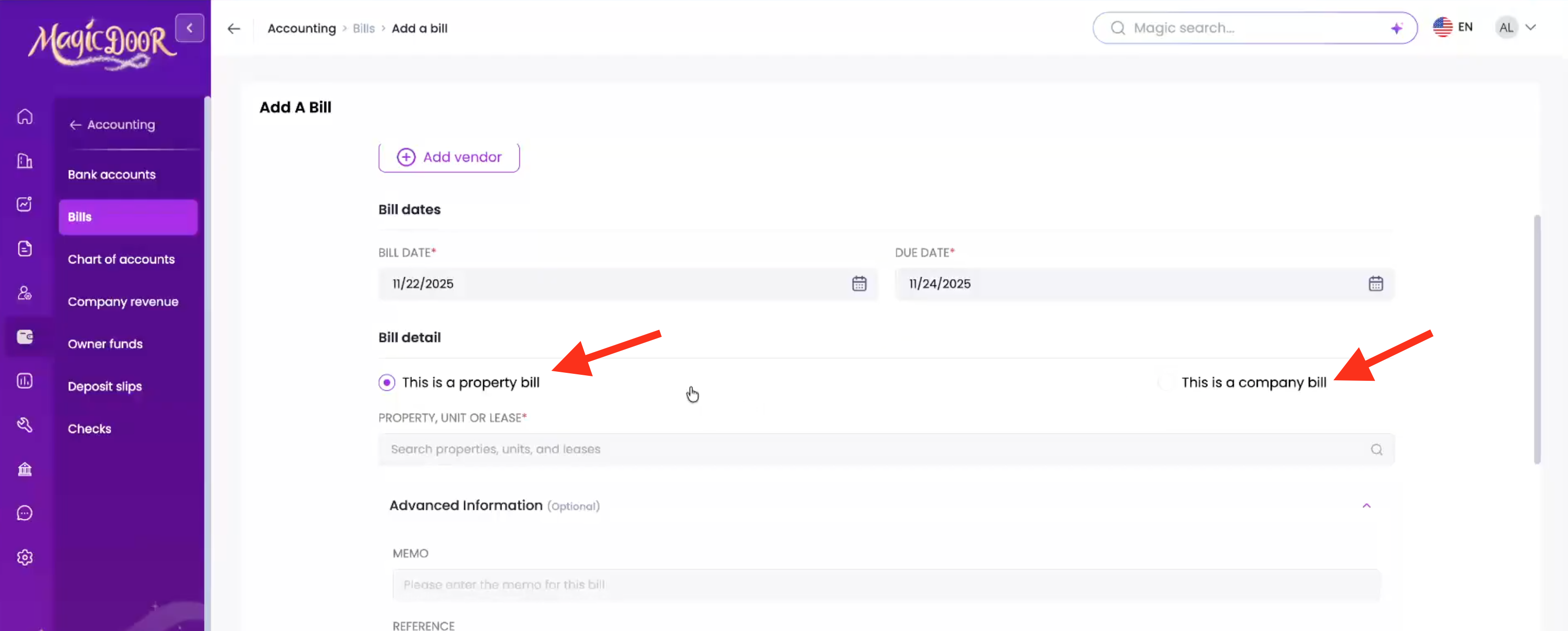
This help article explains the difference between Property Bills and Company Bills in MagicDoor.

It’s divided into clear sections that walk you through:

  • What a Property Bill is, including common examples and how it’s used in property accounting.
  • What a Company Bill is, and how it applies to your business operations.
  • A comparison table outlining key differences between the two.

Use this article as a quick reference when deciding how to categorize new expenses in your accounting module.

What is a Property Bill?

A property bill is an expense linked to a specific property or building. These bills directly relate to the operation, maintenance, or improvement of a property, for example:

  • Repairs or renovations
  • Utilities such as water, gas, or electricity
  • Landscaping or cleaning services
  • Property-specific maintenance costs

Property bills help ensure each building’s financial records remain accurate and separate, making it easier to report on profitability per property.

What is a Company Bill?

A company bill represents an expense tied to the property management company itself, not a single property. Examples include:

  • Office rent or equipment
  • Staff wages and benefits
  • Software subscriptions and professional services
  • Marketing or administrative costs

Company bills reflect the overall business operating expenses and are not charged to any individual property.

Differences Between Property Bill & Company Bill

Feature Property Bill Company Bill
Purpose Tracks expenses for a specific property or building Tracks expenses for the property management company
Examples Plumbing, utilities, maintenance, cleaning Office rent, staff payroll, software fees
Affects Property financial statements Company operating expenses
Bill Type in MagicDoor “Property Bill" “Company Bill”
Linked To One or more properties Company account only
Use Case Assign vendor payments to property-specific budgets Record general business expenses not tied to properties

MagicDoor supports both types of bills, so you can manage property-level and company-level accounting in one place. This distinction helps property managers maintain cleaner records, generate accurate reports, and ensure owners and stakeholders see only relevant expenses.

Need More Help?

If you have questions, our support team is always here to assist.

👉 Contact us anytime at support@magicdoor.com